
Why Interface Design, Selective Conversion, and Global Language Support Actually Matter
Sep 9, 2026
first-story
Seeking
Visibility


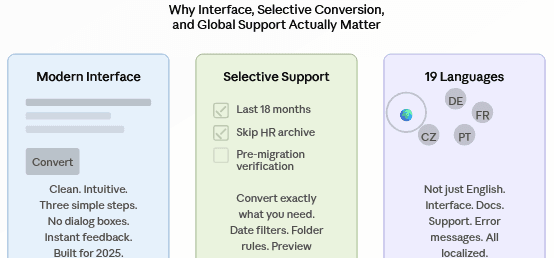
Photo Credit: Illustration showing modern interface, selective conversion, and 19 language support features
The features that separate powerful from useful
The Practical Side of Email Format Conversion
Here's the thing nobody talks about with email conversion software: a powerful tool with a terrible interface is just expensive headache management. You can handle 93 different format pairs, but if the UI looks like it came from 2005 and you can't figure out what you're actually converting, you've got a problem.
ViceVersa Tools fixed that. And not just by making things "look nice"—they built features that actually reduce friction when you're in the middle of migrating a company's email. Let's talk about why.
Modern Interface
You immediately get the philosophy on the home page. Three clean steps. Drag and drop files, select format and convert. That’s the entire workflow. No submenus. No digging through “advanced settings”. No splash screen.
But here's where modern design really pays off: when you're running multi-department migrations, the interface has to stay out of your way. A modern UI in 2025 is:
The buttons are in their expected places. The information hierarchy is clear. What matters most is most visible. Preview windows actually work without lagging. Feedback is immediate. Instead of spitting out cryptic codes, error messages tell you what went wrong. Progress bars show you real progress.
Most email converters look like they were last updated around Windows XP. They’re functional, but heavy. Every conversion is an obstacle course. To convert 500 files you have to go through six dialog boxes. That’s where ViceVersa’s modern interface excels. Less time trying to figure out the software, more time actually converting.
This is more important than it sounds. When you’re working to a deadline—migrating a department before a merger closes, moving a 50,000-user org off Lotus Notes, consolidating PST files from five years of archiving—you don’t want software that makes you second-guess every click.
Targeted Assistance: Transform What You Truly Require
Here is a real life case. Your organization has three years’ worth of PST files on user desktops. You are moving to Office 365. But you don’t want to move everything: HR’s confidential files from 2022 can stay archived, IT tickets from 2021 are dead, and do we really need emails from before the company rebrand?
This is where selective support comes in.
ViceVersa lets you choose exactly what is converted. With date filters you can say, “migrate only emails from the last 18 months.” Rules of conversion can be defined to skip some folders. Before anything reaches the destination you can preview the actual content -- make sure you're migrating what you think you're migrating.
Selective conversion saves time and disk space. It saves you money, too. Office 365 licensing is a pay per mailbox. If you’re not moving 10 years of archived junk, your mailboxes stay smaller and your licensing costs go down. Same efficiency gain, bigger bottom line.
Plus, it removes the “oh wait, we didn’t want that” moment that happens after every migration. An old email from someone pops up and suddenly you’re playing the storage creep game, recovering deleted email or explaining to an executive why their 2018 drafts are searchable again.
Selective conversion means you’re intentional about what moves. Nothing accidental. Nothing coincidental. The only email that counts, getting to where it needs to be.
19 Languages Support: Email is Global, Your Software Shouldn’t Be English-Only
What’s easy to miss is that most IT pros working in multinational companies, outsourcing firms or distributed teams don’t always work in English. Your German subsidiary should take care of this. Migration is handled by your Singapore office. Your Czech team goes conversions.
An email converter that only supports English becomes a limitation.
ViceVersa supports 19 languages, providing teams worldwide with interface, error messages, documentation and support. It's not just translation, it's localizing. The software is designed to be adaptable to regional preferences, date formats, number separators, and the way different languages handle file paths and folder structures.
That’s important because regional IT teams often run the email infrastructure. A French IT Admin shouldn’t have to look at English dialog boxes to figure out what went wrong. A Portuguese administrator will be able to read documentation in Portuguese, not to guess with broken English.
It’s also a sign of how far this software has come that it supports 19 languages: it was built for a global audience, not retrofitted for one. International teams were the target for the code, the documentation and the support structure.
For organizations with distributed IT operations, that’s the difference between a tool that works for everyone, and a tool that works for the English-speaking headquarters and everybody else muddles through.
Where these elements converge
Migrations are stressful; you need modern interface design. You need selective conversion because bulk operations that you have no control over are an accident waiting to happen. You need to support global languages. Modern IT infrastructure is distributed by nature.
ViceVersa tools didn't include those features because they sounded good in marketing. They are the features that make a tool that can do something different than a tool that should do something when your infrastructure depends on it.
Recall your last email migration project. How many times did you wait for old software to react? How many times did you have to migrate data you didn't really have to? How often has someone on your distributed team struggled to understand what the software is telling them?
A modern tool eliminates all those friction points with selective capabilities and global support.
The Details Matter
The homepage headlines talk about converting 93 format pairs and preserving data integrity. Those are the table-stakes features. The modern interface, selective support, and language flexibility are what make the tool actually work—not just theoretically, but in practice, on migration day, under deadline, across time zones.
That's the difference between software that's powerful and software that's actually useful.
- Technology
- Education
- First Story
- Shout Your Vision
- Behind the Headlines
- Internet Access
- Digital Skills
- Global